Sunday, March 7, 2021

Biblical Studies: Material Culture

 Biblical Studies: Material Culture

From the blog

My recent posts have focused on the biblical text and ways to access it online. Here I will turn to the material culture from the ancient environs in which the Bible developed. My focus is oriented more toward resources for digital publication and teaching. I will highlight a select few sites with great resources for bringing the Bible’s ancient environs more to life, as well as some ideas for using the material you find there.

The number of resources for accessing realia of the ancient world online is both substantial and increasing. Nonetheless, I am consistently surprised by how few people incorporate them into their courses and presentations. More shocking is the degree to which educators fail to appropriately source and cite the digital images and resources in their materials. Ultimately, it makes sense to access images or other resources from those who house them without relying on sources like Wikimedia Commons. I don’t mean to disparage Wikipedia or Wikimedia Commons (in fact, this Wikipedia site on artifacts related to the Bible provides an excellent overview of relevant artifacts). But why use that when you can incorporate resources from their original online repositories without any penalties or difficulty?

Reliable sites provide descriptions of how to use their digital objects. Usually, it is as simple as referencing the owner of the copyright. Honestly, academics should model appropriate behavior regarding intellectual property and demand that students and colleagues follow the established legal norms. The best way to do that is by example.

After that homily, let’s consider some digital resources to bring the relevant material culture closer and how to incorporate these into our work. I will mention two types of media here. First, the most obvious: digital photography.

Many museums have begun placing images and descriptions of items in their collections online. Often these are topically oriented, making finding relevant artifacts easy. The Louvre houses an important collection of artifacts from the ancient Near East, with highlights compiles here. This collection contains, for example, a site about the Mesha Inscription including a photo. The photo can be easily embedded in a website or blog by directly linking its URL instead of downloading the photo and uploading it to your site’s server. (Accessing the URL require right-clicking the photo to open it in a new browser tab.) Here’s the image, embedded via its URL:

© RMN-Grand Palais (musée du Louvre) / Mathieu Rabeau.

Don’t forget to cite the source when embedding!

Embedding the URL makes using it a cinch. This method also works to insert images into PowerPoint presentations. In PowerPoint, clicking on the “Insert” ribbon, the “Pictures” button, and then “This Device…”, opens a dialogue box. In the “File name” query you can paste the image’s URL. Then click on the arrow next to “Open” and select “Link to File.” Hitting Enter/Return should add the image to the PowerPoint.

Inserting and Image via URL in PowerPoint.

Reducing the presentation’s file size is the upside, but there are two downsides: displaying the image while presenting requires an internet connection and changes to the link could remove or replace the image. To assuage these issues, use “Link and Insert” instead of “Link to File.” This will embed it in your presentation, but increase the file size of the presentation. However you link it, don’t forget the correct citation!

The most obvious place to look for resources related to the material cultures related to the Bible is the Israel Museum in Jerusalem. They have compiled a ready resource for anyone interested in the intersection of “Archaeology and the Land of Israel,” that extends from the paleolithic period to the Islamic era and the crusaders. Again one finds links to images of the individual artifacts that can be embedded, like these orthostatic lions from Hazor (again, linked via URL).
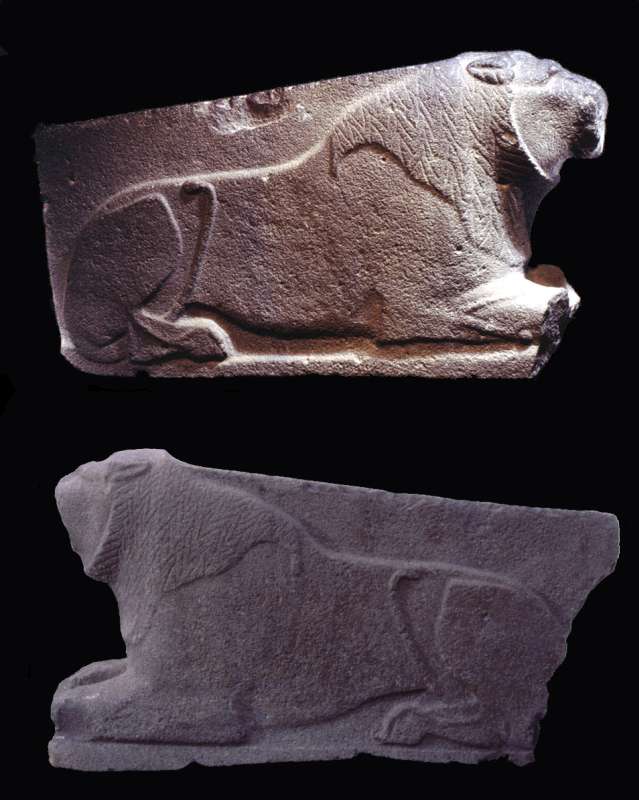
© The Israel Museum, Jerusalem.

However, there is a second method of viewing materials in the Israel Museum. You can virtually tour the Israel Museum with an internet browser or through the “Arts and Culture App” produced by Google (available in the Play Store). Using these, you can view the artifacts virtually as presented in the museum. Both versions are touch-screen compatible and the app uses the device’s gyroscopes to make the experience more immersive. Viewing artifacts as in the museum can provide more background and contextualize items among culturally or chronologically cognate artifacts. For example, the aforementioned lions from Hazor can be found surrounded by other pieces from the Bronze Age (only when viewed in the this way does the reference to “the one on the left” on the image’s page make any sense).

Screenshot: The Hazor Lions at the Israel Museum virtually.

The British Museum provides similar features on its website and in the “Arts and Culture” app. The website provides first-rate images of numerous objects with easily accessible copyright and usability information linked to each images. For access, click on “Collection” on the homepage and then search for the object. Searching for the “Cyrus Cylinder,” for example, leads to the beautiful image below. Clicking on the link “Use This Image” in the bottom-right corner of image’s page leads to a page with download options and information about using the image.

© The Trustees of the British Museum. (CC BY-NC-SA 4.0).

Touring the museum digitally can be used as a fun break or reward within courses. In my recent gamified course on Israel’s history, students could unlock bonus content, including a virtual scavenger hunt for relevant items in the British Museum. Below, one sees what the Cyrus Cylinder looks like in that context, a context with more information about ancient Persia and its culture.

Screenshot: The Cyrus Cylinder, at the British Museum virtually.

Finally, I would like to mention the Bible Lands Museum in Jerusalem. Their website provides access to a closed temporary exhibit, By the Rivers of Babylon, with interactive elements. This preserves the exhibit and makes it accessible to visitors in spite of its having concluded. (A permanent exhibit that now features much of it remains unavailable online.) This presentation thus overcomes both geographical and temporal limitations, opening the experience to a wider audience for a longer time. However, the Bible Lands museum does not provide access to photos of their collections and is, like the Louvre, not available in the “Arts and Culture” app.

I hope you find these resources and ideas helpful. I’d love to hear your ideas as well!

Cover Image: The Cyrus Cylinder.© The Trustees of the British Museum. (CC BY-NC-SA 4.0).

Archival Texts of the Assyrian Empire (ATAE)

 ATAE

From the website:

Archival Texts of the Assyrian Empire (ATAE)

Numerous legal and administrative texts have been discovered at numerous site across the Assyrian Empire. These include the principal Assyrian cities Nineveh (Kuyunjik), Assur (Qalat Sherqat) and Kalhu (Nimrud; biblical Calah), as well as smaller provincial centers such as Burmarina (Tell Shiukh Fawqani), Dur-Katlimmu (Tell Sheikh Hamad), Ma'allanate (unidentified), Til-Barsip (Tell Ahmar), and Tušhan (Ziyaret Tepe). The aim of the Archival Texts of the Assyrian Empire (ATAE) Project is to expand the Nineveh-focused State Archives of Assyria online (SAAo) corpus by creating a complete, open-access corpus of Neo-Assyrian archival texts. Unlike SAAo, the linguistical-annotated texts in the ATAE corpus are arranged by their provenance and the archive in which they were unearthed.

Neo-Assyrian archival texts provide important insights into the economic and legal history of the Assyrian Empire, while also presenting modern scholars with vital impressions of societal structures and private lives of the period. The aim of the project is to make this text corpus easily accessible to scholars, students, and the general public.

ATAE is a key component of the Archival Texts of the Middle East in Antiquity (ATMEA) sub-project of the LMU-Munich-based Munich Open-access Cuneiform Corpus Initiative (MOCCI; directed by Karen Radner and Jamie Novotny). Funding for the ATAE corpus project has been provided by LMU Munich and the Alexander von Humboldt Foundation (through the establishment of the Alexander von Humboldt Chair for Ancient History of the Near and Middle East).

For further details, see the "About the project" page.

Home Page banner credit

Satellite image of the ruins of Assur and the citadel of Kalhu overlaid with general plans of the archives and libraries (Pedersén, Archives and Libraries in the Ancient Near East 1500-300 B.C. p. 133 Plan 62 and p. 148 Plan 68). Image prepared by Jamie Novotny.

Twelfth Birmingham Colloquium on the Textual Criticism of the New Testament YouTube Channel

 Twelfth Birmingham Colloquium on the Textual Criticism of the New Testament YouTube Channel

Recordings of papers delivered online at the Twelfth Birmingham Colloquium on the Textual Criticism of the New Testament from January to March 2021.

1

2
3
4
5
6
7
8
9
10
11
12
13
14
15
 37:03

Sunday, February 21, 2021

Sinai Manuscripts Digital Library: A publication of St. Catherine's Monastery of the Sinai, Egypt

 Sinai mss

From the AWOL:

Sinai Manuscripts Digital Library

The Sinai Manuscripts Digital Library is a publication of St. Catherine’s Monastery of the Sinai, Egypt, in collaboration with the UCLA Library and Early Manuscripts Electronic Library (EMEL). It hosts online the results of the Sinai Library Digitization Project, a ten-year collaborative effort to digitize the unparalleled manuscript library of St. Catherine’s Monastery.

St. Catherine’s Monastery of the Sinai preserves one of the world’s oldest continually operating libraries. It holds some 4,559 manuscript codices, with works in 13 languages written from the 4th to the 19th century. These include the New Finds, a cache of approximately 1,100 fragmentary manuscripts discovered in 1975 when monks cleared debris from an earthquake-damaged room in the north wall of the Monastery.

The Sinai Library Digitization Project is digitizing the Monastery’s manuscripts in two phases:

Phase One
Arabic and Syriac manuscripts

1,172 codices (400,000 pages)

February 2018 through March 2021
Phase Two
Greek, Georgian, Slavonic and other languages

3,387 codices (1.1 million pages)

Dates to be determined

The project benefits from the contributions of digital imaging scientists and technicians, conservators, consulting scholars, librarians, program managers, and software designers in Greece, Egypt, the U.S., and some seven other countries. Phase One is funded by generous grants and gifts from the Ahmanson Foundation, Arcadia, the Museum of the Bible Scholar’s Initiative, and the Steinmetz Family Foundation.

 [Free to use online after registration]

rowse Manuscripts

Friday, February 19, 2021

How to Search Online Museums:

 How to Search Online Museums

From the blog/article:

How to Search Online Museum Collections

Digging Digital Museum Collections: A Series written on a white wall. On the table by the wall, there is an old alarm clock, a small framed image of the glazed brick lion from the Ishtar Gate. The laptop on the right is open and the screen shows a collections search bar of an unidentified museum.

Welcome to the Digging Digital Museum Collections blog series! The Alexandria Archive Institute and Open Context advocate for data sharing, data literacy, open access, and community collaborations. In this series, we explore user experiences with online museum collections and question what we can do to use museum collections data in more accessible, inclusive, and efficient ways.

We will highlight how different museums are sharing their digital collections, interview users of digital content, share “how tos” about using online collections, and try our hand at integrating content from different institutions. 

Part 3: How to Search Online Museum Collections

by Pınar DURGUN

When my friend and colleague Zach Rubin reached out to me to ask about activities students can do in his Meeting with Mesopotamia course, I was excited.  “Why don’t they search for museum objects in online collections?!” is, of course, one of the things I immediately suggested. (You can find more virtual museum activities in this resource.) 

His course looks at important Mesopotamian objects and monuments and questions how they have been used and abused in historical and modern contexts. The online collections search activity would be the perfect opportunity to discuss why objects from ancient Iraq are now on display in the British Museum, for example.

An activity like this would require a guideline for students because 1) not every museum has objects from Mesopotamia, 2) every museum has a different online collections search. Even when museums use the same collections management software (such as TMS, Argus, EMu, PastPerfect, or MuseumPlus), the online public version may look different. 

This is a problem for many students, educators, and researchers: “I falsely assumed that tracing objects across different digital platforms would be relatively easy,” says Emily Mazzola, a Ph.D. student in the History of Art and Architecture Program at the University of Pittsburgh. “It quickly became apparent that this was not the case.”

Some museums already have specific guidelines on how to use their collections. Take a look at the Robert S. Peabody Institute of Archaeology and the British Museum’s guides.

Sophia Walker, Learning and Community Programs Project Manager for Museum of Fine Arts Boston, informs me that MFA Boston is also putting together a resource on how to do a search in their collections. This resource, Sophia says, is a result of conversations that happened in their teaching workshops and is based on the feedback teachers provided. It is a collaborative effort where the library, accessibility, education, visitor service, and curatorial departments of the museum have contributed. Keep an eye out for MFA Boston’s search guide coming out by the end of February 2021!

Such guidelines are very helpful in figuring out how the online search in that specific museum collection works. On the other hand, these guidelines are often institution-centered, meaning that the guidelines may work perfectly for searching one museum’s collections, but not so much for searching across different museum collections.

There are efforts to compile museum images through platforms like Mirador, CLEO or APE. Soon we can also find educational museum resources streamlined through Museums for Digital Learning (MDL), which we are very excited about! At the moment, educators and students teaching and learning remotely need easy to access tools to use online museum collections and resources. 

A two-year study by the Smithsonian Center for Learning and Digital Access showed that a brief and effective training —even a one-hour orientation—improved digital museum use. You can read more about this study here. Based on this study and testimonials by students like Emily and educators like Zach, we created a video to get searchers started on their online collections journey.

You can read the transcript of the video here or turn on the close captions on Youtube.

While watching the video consider the following:

The key is “keywords”

Finding the right search words is key to getting your desired results. If you don’t want to spend too much time trying out different keywords, you may want to invest some time in gathering contextual information. The easiest way to find the related keywords is to look up “who, what, where, when” and use those as keywords (bolded). For example:

Who/artist: “Frida Kahlo”

What/artwork: “Self-portrait” 

Where/culture-place: “Mexico” (you can add this in the geographical location filters)

When: 1940 (some museums have era/period filters as well)

Alternative search terms: “surrealism” (in other collections: Mexicanidad)

On a white background is the name of the artist Frida Kahlo (Mexican, 1907-1954) is written in black under the MoMA logo and page navigation. There is a small black and white photo of Kahlo on the right corner. The text reads: “Frida Kahlo began to paint in 1925 while recovering from a near-fatal bus accident that devastated her body and marked the beginning of lifelong physical ordeals. Over the next three decades, she would produce a relatively small yet consistent and arresting body of work. In meticulously executed paintings, Kahlo portrayed herself again and again, simultaneously exploring, questioning, and staging her self and identity. She also often evoked fraught episodes from her life, including her ongoing struggle with physical pain and the emotional distress caused by her turbulent relationship with celebrated painter Diego Rivera.” Below the  text is an example of one of the three works online, which is  the “Self-portrait with Cropped Hair.”
Figure 1: A screenshot of the search result for “Frida Kahlo” in the Museum of Modern Art Collections search.

Even though there are standardized vocabularies, each museum categorizes and tags its artworks and objects differently.

Dr. Yelena Rakic, Associate Curator at the Metropolitan Museum of Art’s Ancient Near Eastern Art Department, says that one of the advantages to using online museum collections searches is that you can often sort your results in multiple ways. If you are getting too many results, try an “advanced search.” This means using filters by geographic area, period, material, or department. Many museums provide these general categories as suggestions in their collections search (such as MFA Boston). The Walters Art Museum has extra suggestions such as “artwork of  the day” or “community collections.” 

Dr. Rakic notes one big difficulty of using online museum collections: the inconsistencies in cataloguing terms across institutions but also within an institution. Being patient and prepared, therefore, is the second key to achieve the best search results. When searching for a place name, try its ancient (or modern) name if nothing is coming up. If the term is in an ancient language, one may need to try different spellings.

Alternative spellings and words are therefore useful: If your search on “vessel” is not bringing up the desired results, try keywords such as “vase,” “pottery,” “ceramic,” “bowl,” pot,” or culturally-specific terms such as ”lekythos.” 

You can use general search engines to prepare for your museum collections search. Luiza Osorio G. Silva, a Ph.D. student at the University of Chicago, says her first instinct is usually to do a more general search to bring up as many objects as possible. Then, once she has narrowed down the search, she looks into museum collections searches “because the information they provide is generally superior to anything else one might find on the internet (other than academic or scientific articles).” The reason for this is because database entries and object descriptions are almost always written by curators, collection managers, researchers, and other experts. 

In the video, we used the example of a Google search, as it is the most commonly used search engine. But there are some ethical issues surrounding Google, such as privacy concerns and biases in the algorithm, especially against women and People of Color. Read more about how search engines reinforce racism in Safiya Umoja Noble’s book Algorithms of Oppression. Alternatively, you can use other search engines such as DuckDuckGo or StartPage to gather contextual information and find good search terms. 

Look out for outdated language and information

Make sure to check if there is a date on your collection search results or object information pages. Double-check the dates of museum blogs, articles, and resources such as the Metropolitan Museum of Art’s Timeline of Art History essays that we point to in the video. Some of the information in these pages may have been written and entered into the database a long time ago and may include outdated, offensive, and racist language. It is important to address these issues in a way that is visible on object pages. The Harvard Peabody Museum acknowledges on their collections search page that:

“Collections records may contain language, reflecting past collecting practices and methods of analysis, that is no longer acceptable. The Peabody Museum is committed to addressing the problem of offensive and discriminatory language present in its database. Our museum staff are continually updating these records, adding to and improving content.”

If you are an educator, it is a good idea to do a little bit more research on the appropriate terms that scholars and communities use today and suggest those as keywords to your students. You can point out to students why these terms or ideas are outdated, racist, colonial, or orientalizing. If you feel inspired to do the work, you can contact the museum and let them know. Museums often have a general contact email, commonly found under “Contact us.”

Quick tips for a successful online museum search:

Do some research on contextual information: who, what, where, when?
Think about alternative search terms.
Find out if the museum has a guideline for their online collections search.
Use advanced search or search filters.
Use the museum’s suggested categories or read through their resources to find out what keywords they use.
Bonus: You can search in a general search engine about the object /artwork by adding “museum” after your keyword to see which museums have similar objects.
Check the date of the museum’s object page, blogs, articles, videos, other information.
Be patient:)
Allow yourself to explore!

Don’t be afraid to expand your search

One of the most exciting things about online museum collections is that there is no end to exploring and discovering. We tried to give some suggestions to aid you in finding specific results. But looking through seemingly unrelated results may inspire your research in unexpected ways. Eric Kansa, the Program Director at Open Context, once made the point that getting lost in search results is like getting lost in a library. You never know what exciting book you will find on the bookshelf just across the book you are actually looking for. 

To keep things short and sweet, we limited the number of museum collections represented in the video to the highest voted ones on the Art History Teaching Resources Facebook poll. But there are small museums out there that have wonderful resources and interesting collections. Don’t limit your search to the big encyclopedic museums. Find out what your local museums have in their collections. And feel free to reach out to these museums or your school librarians to help you with your search.

Make sure to visit our Resources page for a printable worksheet on searching online museum collections and more pedagogical materials.

Keep an eye out for our future blogs on using museum collections for research and using museum images. Let us know if there are any other blogs or resources you would like to see.

Happy searching🔍